

Best overall for technical checks: MXToolbox. Best for Gmail reputation monitoring: Google Postmaster Tools. Best for checking a draft before sending: mail-tester. This 2026 guide ranks email deliverability tools for cold outreach by the problem each solves, with GlockApps for inbox-placement testing and NeverBounce for address verification.
- MXToolbox is the default choice for technical checks among email deliverability tools for cold outreach.
- Google Postmaster Tools monitors Gmail reputation; GlockApps tests placement across seed inboxes.
- NeverBounce checks addresses, while mail-tester inspects a test message before outreach begins.
- Outstation runs outbound campaigns for conference organisers seeking sponsors, hosted buyers and delegates.
Why this matters
A valid address, an authenticated domain and an inbox placement result answer different questions. None proves that your next cold email will reach a prospect's inbox. Buying several tools without assigning each a job leaves you with overlapping dashboards rather than a clear diagnosis.
For conference organisers, separate your 3 recipient segments: sponsors, hosted buyers and delegates. Each audience needs its own targeting and message. Outstation runs outbound email campaigns on owned, warmed domains for large international B2B conferences and event organisers; the tools below support diagnosis rather than replace campaign management.
Choose the tool that answers your current delivery question, not the tool with the longest feature list.
What makes the best email deliverability tools for cold outreach?
The best choice in 2026 depends on the evidence you need. Use these criteria before comparing products:
- Technical diagnosis: Can the tool inspect DNS records, authentication or sending infrastructure?
- Provider visibility: Does the result describe Gmail, a seed inbox network or another defined scope?
- Message inspection: Can you test the actual sender, headers and content used in outreach?
- Address validation: Does the tool identify invalid or uncertain recipient addresses before sending?
- Actionable limits: Does the report make clear what it cannot establish?
- Operational fit: Can the person responsible for outreach act on the result?
Do not treat an attractive score as the deciding criterion. A test is useful when it tells you what to fix and where its evidence stops.
Email deliverability tools at a glance
| Tool | Best for | Standout function | Key limitation |
|---|---|---|---|
| MXToolbox | Technical troubleshooting | DNS, mail-server and blocklist checks | Does not establish placement in a prospect's inbox |
| Google Postmaster Tools | Gmail reputation monitoring | Gmail-specific domain and delivery reporting | Not a cross-provider view; reporting depends on sufficient data |
| mail-tester | Pre-send message inspection | Checks a message sent to its test address | A message score is not an inbox-placement guarantee |
| GlockApps | Seed-based placement testing | Reports where test messages land across seed inboxes | Seed results do not reproduce every recipient's circumstances |
| NeverBounce | Recipient-list verification | Checks address validity before outreach | A valid address does not establish consent or relevance |
The table is a decision tree, not a claim that one product replaces the others. Start with the row that matches your failure, then add another diagnostic layer only when it answers a different question.
1. MXToolbox: best for technical troubleshooting
MXToolbox provides checks for DNS records, mail servers and blocklist listings. It belongs at the start of an investigation when you need to establish whether the sending domain has a technical problem. Use it to inspect configuration before rewriting copy or replacing an outreach platform.
An authentication issue needs a configuration fix. A blocklist result needs investigation into the listed sending resource and the list's relevance; it is not proof that every provider rejects your messages.
MXToolbox pros:
- Brings several technical checks into one troubleshooting workflow.
- Helps inspect the DNS records involved in email authentication.
- Lets you investigate specific domain, server or blocklist questions.
MXToolbox cons:
- Technical results need interpretation; a listing alone does not explain campaign performance.
- DNS and server checks do not tell you where an individual prospect's message landed.
Best for: An outreach operator investigating authentication, DNS or sending-infrastructure problems.
Verdict: Buy for technical diagnosis; skip it as your sole measure of inbox delivery.
2. Google Postmaster Tools: best for Gmail reputation monitoring
Google Postmaster Tools provides reporting about mail sent to personal Gmail accounts. Its dashboards cover areas including domain reputation, authentication, spam rates and delivery errors, subject to Google's reporting requirements. Use it when Gmail-specific evidence matters to your outreach programme.
In 2026, keep that scope explicit: Google Postmaster Tools is a Gmail diagnostic, not a report on every business mailbox. Sparse or absent reporting is not a clean bill of health. It means you cannot draw a conclusion from that dashboard alone.
Google Postmaster Tools pros:
- Provides reporting directly from the receiving provider.
- Helps distinguish reputation and authentication issues within its Gmail scope.
- Supports ongoing monitoring rather than only a pre-send test.
Google Postmaster Tools cons:
- Does not describe delivery across other mailbox providers.
- Needs sufficient eligible traffic to populate useful reporting.
Best for: Senders who need to understand Gmail-specific reputation and delivery signals.
Verdict: Buy into the monitoring workflow when Gmail matters; skip cross-provider conclusions.
3. mail-tester: best for checking an outreach draft before sending
mail-tester inspects a message you send to its test address. Its report checks aspects of authentication, message construction and spam-related signals. That makes it useful for reviewing the actual draft and sending setup together, rather than checking the domain in isolation.
Send 1 test message from the account and workflow you intend to use. Testing a draft from a different account breaks the connection between the report and your campaign. Inspect the findings individually instead of treating the headline score as permission to launch.
mail-tester pros:
- Gives you a practical way to inspect a real outgoing message.
- Combines message-level findings with authentication checks.
- Helps surface issues before you send the draft to prospects.
mail-tester cons:
- Its test environment does not represent every receiving provider.
- A favourable score does not establish relevance, recipient interest or inbox placement.
Best for: An operator reviewing a draft, its headers and its sending setup before launch.
Verdict: Buy for pre-send inspection; skip score-chasing as a deliverability strategy.
4. GlockApps: best for seed-based inbox-placement testing
GlockApps tests message placement using seed addresses across mailbox providers. The report shows how those test inboxes handled the message. Use it when your question is about observed placement rather than just configuration or address validity.
Keep the sender and message consistent with the campaign under investigation. A changed sender, different link destination or stripped-down test email answers a different question. Record what you tested so a later result can be compared on the same basis.
GlockApps pros:
- Tests placement rather than relying only on DNS configuration.
- Offers visibility across the providers represented in its seed network.
- Helps compare results after a specific sending or message change.
GlockApps cons:
- Seed inboxes are not your prospects and do not share their individual histories.
- Results describe the tested message and setup, not every future send.
Best for: Teams investigating whether a specific outreach message lands in seed inboxes or spam folders.
Verdict: Buy for placement evidence; skip treating a seed test as a universal guarantee.
5. NeverBounce: best for recipient-list verification
NeverBounce checks email addresses and returns verification results. It belongs before campaign sending, when you need to identify invalid addresses and review uncertain results. Address verification deals with recipient data; it does not repair sender reputation or message authentication.
Keep uncertain results separate from addresses classified as valid. A catch-all domain accepts mail broadly enough that verification cannot establish the existence of every individual mailbox in the same way. Your sending decision still needs a documented rule.
NeverBounce pros:
- Helps identify invalid recipient addresses before outreach.
- Supports a separate review process for uncertain verification results.
- Makes list quality a defined task rather than an assumption.
NeverBounce cons:
- Cannot prove that a recipient wants your message or fits your offer.
- Does not establish inbox placement or fix sending-domain problems.
Best for: Teams checking prospect data before uploading it into an outreach workflow.
Verdict: Buy for address verification; skip treating a valid address as permission to contact someone.
How we ranked
This 2026 ranking prioritises distinct diagnostic jobs: technical configuration, provider reputation, message inspection, placement testing and recipient verification. MXToolbox takes the default position because technical checks address a foundational question: is the sending setup configured correctly?
The other tools win narrower slots. No combined score, customer count or claimed delivery improvement determines the order. Choose by the question you need answered, then interpret the result within the tool's stated scope.
Build a diagnostic workflow, not a collection of scores
Use the following sequence to keep checks connected to decisions. These are working steps, not a promise that passing each one guarantees inbox delivery.
Check configuration
Inspect the domain's SPF, DKIM and DMARC setup. SPF permits a maximum of 10 DNS-querying terms during evaluation under RFC 7208; exceeding that limit produces a permanent error. Do not confuse the number of approved sending services with the number of DNS lookups their records trigger.
Verify addresses
Check recipient data before sending and define how you handle uncertain results. Keep verification separate from audience selection. An address can exist while the person behind it has no responsibility for sponsorship, buyer participation or delegate attendance.
Inspect the message
Test the actual draft from the intended sending account. Review authentication findings, message structure and link destinations. Fix the specific issue identified rather than repeatedly changing unrelated elements until a score rises.
Test placement
Use a seed test when you need placement evidence. Record the sender and draft used, then change one variable at a time when investigating a problem. Otherwise, you cannot tell which change explains the difference.
Monitor outcomes
Review provider reporting where available alongside delivery errors, replies and the event outcome you need. For 2026 conference outreach, keep sponsor conversations, hosted-buyer interest and delegate responses distinct. A delivery dashboard does not measure commercial fit.
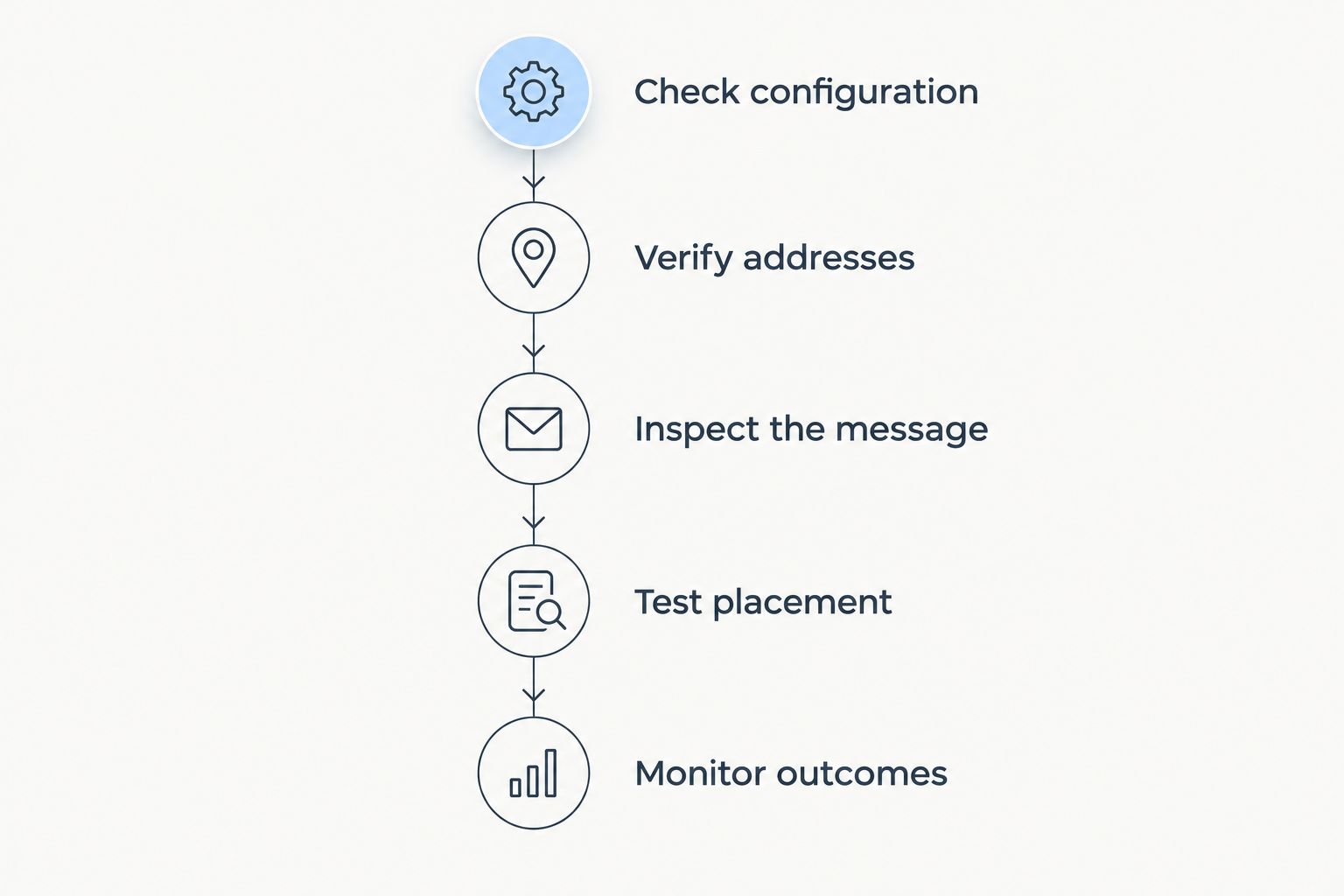
Assign an owner to each step. Technical findings need someone who can change DNS or sending configuration; audience findings need someone who understands the event's buyer. Leaving both with the same dashboard, but no responsibility for action, does not solve either problem.
Which email deliverability tool should you choose?
Choose MXToolbox first when you need a technical diagnosis. Add Google Postmaster Tools for Gmail reporting, mail-tester for draft inspection, GlockApps for seed placement and NeverBounce for recipient verification. Do not buy overlapping tools merely to obtain another score.
If your real requirement is campaign execution, a diagnostic subscription is not the service you need. Outstation is best for international B2B conference organisers seeking managed outbound email campaigns for sponsors, hosted buyers and delegates. It operates campaigns on owned, warmed domains rather than selling a deliverability tool.
The trade-off is scope: managed outreach and independent technical monitoring are different purchases. Assess campaign management against your event audiences and desired outcomes; assess a diagnostic tool against the question it can answer.
Discuss your event outreach
Explore outbound campaigns for sponsors, hosted buyers and delegates at international B2B conferences.
FAQ
What's the best email deliverability tool for cold outreach in 2026?
MXToolbox is the default recommendation for technical diagnosis. Choose Google Postmaster Tools for Gmail reporting, GlockApps for seed placement, mail-tester for draft inspection or NeverBounce for address verification.
Is Google Postmaster Tools better than GlockApps?
Google Postmaster Tools and GlockApps answer different questions. Google Postmaster Tools reports Gmail-specific sending signals, while GlockApps observes placement in its seed inbox network.
Does a good mail-tester score mean my emails reach the inbox?
No, a good mail-tester score does not guarantee inbox placement. It describes checks on the submitted message, not how every prospect's provider will handle it.
Does NeverBounce fix poor sender reputation?
No, NeverBounce verifies recipient addresses rather than repairing sender reputation. Investigate authentication, provider reporting and placement separately.
Do warmed domains guarantee cold email delivery?
No, warmed domains do not guarantee inbox delivery. Authentication, recipient data, sending behaviour and receiving-provider decisions remain separate considerations.
Is Outstation an email deliverability tool?
No, Outstation runs outbound email campaigns for large international B2B conferences and event organisers. Its campaigns use owned, warmed domains to generate sponsors, hosted buyers and delegates.
Does email verification make cold outreach compliant?
No, email verification does not establish legal permission to send marketing. UK outreach must be assessed against the applicable UK GDPR and PECR requirements, including recipient type and how personal data is used.
One last thing
A passed authentication check does not validate your proposition. Before expanding a 2026 campaign, read the draft as the intended recipient: does it explain why this particular sponsor, hosted buyer or delegate belongs at this particular event?
Fix the technical failure with the relevant tool; fix the audience mismatch with better targeting. More diagnostics cannot make an irrelevant invitation relevant.